Your first puzzle
From the tray to the picture: your first moves in Fun Journey.
Start with one recognizable detail, drag its piece into place, and let that match guide the next one. This walkthrough explains the actual board and tools in Jigsaw Puzzles: Fun Journey, using the puppy puzzle pictured here as a visual example.
Read the guide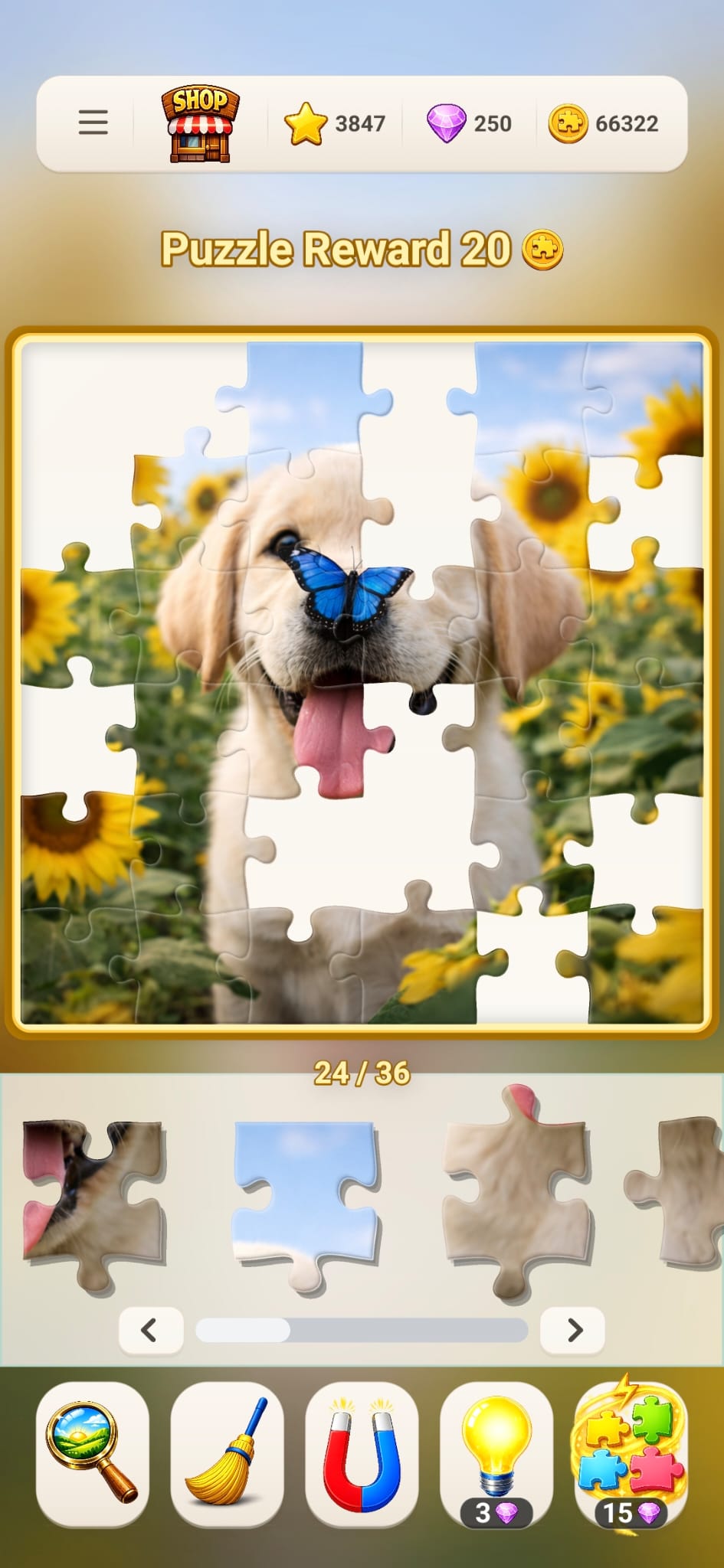
1. Get your bearings on the first board
On a fresh start, Fun Journey introduces its controls through a partly completed 36-piece Journey puzzle. Some pieces are already in place so you can concentrate on moving the remaining ones. The first launch includes a drag tutorial; follow its highlighted piece before exploring the other controls. If you have played before, you may return to your existing progress instead.
The large picture area is the board. The horizontal strip beneath it is the tray, which holds pieces you have not placed. A counter below the board shows how many pieces are correctly placed out of the total. The puppy screenshot is an example of this layout, with 24 of 36 pieces in place; its balance and reward numbers describe that particular screenshot, not a starting allowance.
Take a moment to identify two or three landmarks. Here, the blue butterfly sits near the center, the puppy's dark nose lies beneath it, and yellow sunflowers appear around the sides. You now have several locations to compare with the fragments in the tray.
2. Match a detail, then drag the piece
Look for a fragment that contains something distinctive: part of the tongue, an outline of the ear, or a boundary between blue sky and pale fur. Touch the piece in the tray, drag it toward the corresponding part of the board, and release it. Use the visible picture around the gap to judge where it belongs.
For example, a pink tongue fragment is a better first candidate for the puppy's mouth than for the flowers. Narrow that down further by checking whether its dark outline continues the mouth already on the board. Color locates the neighborhood; the continuation of the image helps identify the actual position.
Pieces stay upright in Fun Journey, so there is no rotation control to learn. Concentrate on position. If a placement interrupts the picture or leaves the piece in the wrong area, reconsider the match. Repeatedly dropping the same uncertain fragment into nearby spaces is usually less informative than looking for another detail on it.
3. Look through the remaining pieces
The tray can contain more pieces than fit across the screen. Scroll through it horizontally or use its arrow controls to inspect the rest. Moving through the tray is different from taking a particular piece up to the board: browse first, then select the fragment you want to place.
Give yourself a specific search. Instead of looking for any piece that might fit anywhere, look for the next bit of the butterfly, a sunflower center, or a straight top edge with blue sky. When that feature is complete, choose another. This approach lets you work with a small, understandable part of the image.
You do not have to complete the entire border before working inside the picture. In this example, the face and butterfly may be easier to recognize than several similar sky pieces. Use whichever clue you can explain most clearly.
4. Learn what each tool actually does
| Tool | How to use it | What to expect |
|---|---|---|
| Picture preview | Press and hold the picture-preview control. | Compare your current work with the complete image while holding it. |
| Sweep | Tap the broom. | Return loose, incorrectly placed pieces from the board to the tray. |
| Edge organizer | Tap the magnet-shaped control. | Bring corner and edge pieces forward in the tray; it does not finish the border for you. |
| Hint | Tap the light bulb when you want a piece placed. | A hint places one eligible tray piece and currently costs 3 gems. |
| Power Boost | Use the multiple-piece booster when it is available. | It places several pieces and normally costs 15 gems. |
Start by using the preview to answer a concrete question, such as whether a sunflower belongs above or below the puppy's ear. Release it and look for the corresponding fragment. The preview is most useful when you return to a specific feature.
Hints and Power Boost spend in-game gems, so check the displayed price and your balance before choosing them. Power Boost is initially locked during the first Journey puzzle and is introduced later. You can continue solving by hand; using a paid booster is a choice, not a step required by this walkthrough.
5. Finish a section—or leave it for later
Once a landmark is assembled, follow its boundary into the next area. Around the puppy, the outline of an ear can lead you toward the sky or flowers. A broad patch of similar fur may become easier to locate once its neighbors are established. Keep checking both the picture and the shape of the available space.
Fun Journey saves unfinished solo puzzle progress locally, including the current board state. Progress is also persisted when the app moves into the background. You can return to an unfinished puzzle instead of treating every session as a commitment to finish. A useful stopping point might be the completed butterfly or a connected section of the border.
Local saving and account saving serve different purposes. The optional Save Progress connection uses Google Play Games and Firebase to save and restore progress across devices. If you want that protection, connect the account through Save Progress. Removing the app can remove local progress, so a saved board on one device should not be mistaken for an account backup.
6. Choose what you want from the next puzzle
Journey gives you a sequence to follow, with puzzles using 36, 64, or 100 pieces. When you reach a piece-count setup in Daily or Collections, the choices extend through 36, 64, 100, 144, 225, and 400. A smaller count gives you fewer fragments to examine and more of the image on each one. Move up when you want a larger search, not because there is a required pace.
Daily offers a recurring picture choice and tracks daily completion streaks. The current daily rules provide one free puzzle and a second puzzle that unlocks for 25 gems. Collections groups pictures into packs that unlock with coins. Stars record progress and rewards; they are not the currency used to buy collection packs.
Battle is an optional competitive mode, with online matches and friend invites. Release builds require a connected Play Games account, and a JigsawBOT option can appear when no other player is found. For your first attempt, a solo puzzle gives you room to inspect the controls at your own pace.
Bundled or already downloaded puzzle images can be played locally. New image downloads, online battles, purchases, and cloud services need a connection. If you plan to play somewhere without internet, open and download the picture you want beforehand. Then choose one recognizable section and repeat the same simple process: inspect, match, and place.
Questions before your next puzzle
Why does my first Fun Journey puzzle already have pieces placed?
The introductory Journey puzzle begins partly assembled so you can learn dragging with fewer pieces left to place. A fresh start uses a 36-piece board and a guided first move. Returning players may see their existing progress instead.
How do I see the full puzzle picture?
Press and hold the picture-preview control below the board. Use it to locate a specific object or boundary, then release it and compare the pieces in your tray with that area.
Do I have to buy hints to finish a puzzle?
No. You can solve by placing pieces yourself. Hints and Power Boost are optional gem-spending tools; the current hint price is 3 gems, and Power Boost normally costs 15 gems.
Can I rotate pieces in Fun Journey?
Pieces remain upright. The game asks you to identify each piece’s position using the image, its neighbors, and its shape, without a piece-rotation setting.